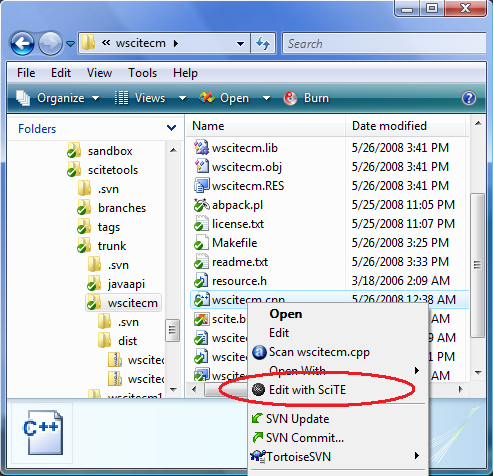
Windows SciTE Context Menu (WSciTEcm) is a context menu handler that gives the ability, on Windows, to quickly open selected files with the source code editor SciTE in Windows Explorer.
Summary
- Product Name: Context Menu Extension for SciTE (a.k.a. WSciTEcm)
- Version: 1.4.0
- Date: 12/06/2008
- Operating System: Windows 2000, XP, Vista, Vista 64-bit
- License: Open Source Software, MIT License
- Download Binaries: wscitecm140.zip (20kB)
- Download Source: wscitecm140_src.zip (12kB)
Installation
For a friendly installation, I recommend to use the SciTE setup provided by Bruce Dodson. This Windows installer facilitates the deployment of a custom built version of SciTE and includes additional helpers such as the Context Menu Extension. Check the choice Register shell extension during the installation process.
For a manual installation, read the section Manual Installation below.
Manual Installation
- Copy wscitecm.dll in the SciTE directory. Refer to the section Unload the dll below if you have the error: Access is denied.
- In the SciTE directory installation, type the command:
regsvr32 wscitecm.dll. This registers the DLL. A new entry Edit with SciTE is available in the menu displayed when you right-click on selected files in Windows Explorer.
Installation on Vista 64-bit
The package containing the binaries includes wscitecm.dll and wscitecm64.dll. On Vista 64-bit, use wscitecm64.dll.
Dependencies
Versions 1.3.0 and 1.4.0 were built with Visual Studio 2005. Therefore, you may need to download and install the corresponding redistributable package. Here are the Microsoft URLs for the redistributable packages:
- Microsoft Visual C++ 2005 SP1 Redistributable Package (x86)
- Microsoft Visual C++ 2005 SP1 Redistributable Package (x64)
Uninstallation
- Due to the introduction of a different GUID in version 1.4.0, is it important to uninstall any version up to 1.3.0 prior to installing any 1.4.0 and above version. If you forget the uninstallation step you may end up with two entries in the context menu. Nevertheless you can still solve this issue by editing the registry or simply by using wscitecm-remove.reg as explained below.
- To uninstall a 1.2 version and above:
- In the SciTE directory installation, type the command:
regsvr32 /u wscitecm.dll.
- In the SciTE directory installation, type the command:
- To uninstall a version prior to 1.2:
- Double-click on the file wscitecm-remove.reg (included in the source and binary packages). This will clean-up the old registry keys. This script was provided by Bruce Dodson.
Unload the DLL
If you try to delete or override the wscitecm.dll and you get the error Access is denied, it means that the library is already loaded. There are several options to workaround this issue:
- Solution 1:
- Close all the Windows Explorer instances open on your desktop and copy wsctecm.dll using the command line (Example:
copy wscitecm.dll scite_directory).
- Close all the Windows Explorer instances open on your desktop and copy wsctecm.dll using the command line (Example:
- Solution 2:
- Reboot the computer and delete or override wscitecm.dll (Example:
copy wscitecm.dll scite_directory) before starting Windows Explorer and before using the context menu.
- Reboot the computer and delete or override wscitecm.dll (Example:
- Solution 3:
- Open a command line window
- Press Ctrl+Alt+Del to display the Windows Task Manager, display the Process tab and kill the explorer.exe process.
- If the exlorer did not restart automatically, start it manually from the command line window: C:/>explorer.
- Delete or override wscitecm.dll before using the context menu (Example:
copy wscitecm.dll scite_directory).
Build
Until version 1.2.1, wscitecm was built with Visual C++ 6.0. Versions 1.3.0 and 1.4.0 were built with Visual Studio 2005. A Makefile is provided with the sources: in the source directory, type nmake. Ensure that all the environment variables and paths are set correctly. To do so, use the command file VCVARS32.BAT available in the bin directory of Visual C++ installation.
File Releases
- wscitecm140.zip (20kB)
- wscitecm140_src.zip (12kB)
- wscitecm130.zip (20kB)
- wscitecm130_src.zip (12kB)
- wscitecm121.zip (8kB)
- wscitecm121_src.zip (11kB)
Release Notes
- Version 1.4.0 (12/06/2008):
- Fixed an issue with the manifest file introduced with Visual Studio 2005 compilaton
- Created a new GUID to avoid conflict with Notepad++ reusing this wscitecm code with the same GUID.
- Version 1.3.0 (05/28/2008):
- Paul Roukema implemented fixes to provide support for Windows Vista 64-bit
- Built with Visual Studio 2005
- Fixed warnings related to string functions
- Version 1.2.1 (01/21/2003):
- Released under the MIT License and packaged with the source code.
- Version 1.2:
- Registration and unregistration of the Shell Extension embedded in the DLL (wscitecm.dll).
- SciTE icon displayed in the context menu.
- Version 1.x:
- Initial version.
Derived Work
To address personal needs, Angelo Mandato has been maintaining a forked version of WSciTEcm since 01/27/2004.
Legal
Microsoft and Windows are either registered trademarks or trademarks of Microsoft Corporation in the United States and/or other countries.

January 4th, 2008 at 4:18 pm
Hello André,
thank you very mutch for the “SciTE Context Menu Extension”.
Very great Code!
I have modify your project to use it for a upcoming version
of my program Drag’n'Crypt ULTRA (i will give you full credits for your work).
I hope this is OK for you.
With best Regards
Hajo Schlingensief
January 4th, 2008 at 11:02 pm
Hajo,
You are welcome! This code is available under the MIT license, so there should not be any problem. I’m glad it can be useful. Be aware that the current version is not working properly on Vista 64bit. This issue was reported to me a while ago by Don Ho, the lead developer of Notepad++. I started to work on a fix, but got distracted by other priorities and it is still pending… Let me know if you face the same issue. Thanks. - André -
February 26th, 2008 at 7:30 pm
Andre,
I saw your DLL through looking at SciTE. If I were to use your code for my own application for a context handler would you be able to show what parts of the code I need to modify?
Abel
February 27th, 2008 at 7:33 am
Hi Abel,
Here is a brief summary of changes that could be done in order to fit a different application:
- André -
May 3rd, 2008 at 3:49 pm
I find this extension to be indispensable, but have recently moved to a 64-bit vista environment. I’ve managed to get the extension to compile in 64-bit mode using the compilers included in the windows SDK. The makefile needs some tweaking and variable needs to be changed in type, other than that, smooth sailing.
May 4th, 2008 at 12:20 am
Hi Paul,
- André -
Would you mind to share your modifications? I never had a chance to address this issue and it would be nice if everyone using this feature on Vista 64-bit could also benefit from some “smooth sailing”
May 11th, 2008 at 3:25 pm
I think I just run regsvr32 as administrator under vista x64, and then the context menu works after reboot.
May 16th, 2008 at 9:44 am
Here’s the x64 version if you need it: http://timebend.com/WSciteCMx64.dll
May 26th, 2008 at 9:34 pm
Paul Roukema shared the source code fixing issues on Vista 64-bit. Those fixes have been merged into wscitecm version 1.3.0 and available for download in this article. Thank you Paul for this contribution. - André -
June 16th, 2008 at 11:53 pm
Hey André,
I have the most curios problem with the Scite context menu handler. I installed Scite via Dodson’s package (i believe it’s the same) and for a while had the menu item alright. However, after installing the Notepad++ application it seemed to replace Scite in the context menu. I had an extensive research on this last night and after trying to mimic every key I found about Notepad++ in the registry, I still got nothing. After seeing the source of your DLL, I believe the reason for this is that SOMEHOW Notepad++ uses the same GUID as CLSID in the registry. I always thought the chances for that are practically zero, but here we are. Either they were generated the same independantly which seems almost impossible or maybe the Notepad++ registration dll has used this one as a model, I don’t know.
Anyway,
i guess that by using my new GUID in the .h file and rebuilding, I’m gonna do the trick. But thought you should know and maybe contact the notepad++ team or change the guid yourself in your DLL, as I am pretty sure everyone having both programs will have this problem, bearing in mind that uninstalling Notepad++ won’t help unless I re-register wscitecm.dll.
Of course there are other options to put yourself in the context menu via registry only (the way I discovered EditPad to use, create a key in HKEY_CURRENT_USER\Software\Classes\*\shell) so I could have used that to restore my menu item, but I just wanted to understand the problem.
June 16th, 2008 at 11:55 pm
After a reread, I might clear some confusion by pointing out that by “my new GUID” I mean the GUID I generated anew and put as CLSID in the registry trying to mimic Notepad++’s own that apparently replaced the original SciTE one.
I had written this, but apparently deleted this particular sentence somehow before posting..
June 17th, 2008 at 7:20 am
Hi Jorr,
Thanks for your comments and for sharing your experience. Sorry that you encountered this problem. This is indeed a known issue that I recently brought to the attention of Don Ho, the lead developer of Notepad++. Notepad++ context menu is based on wscitecm source code, hence this issue. To limit impacts on SciTE users and prevent clashes with Notepad++, I will shortly produce a version of wscitecm with a new unique identifier. - André -
June 17th, 2008 at 9:44 am
Thanks, Andre
I’ll be waiting for your patch since apparently I lack some important know-how about DLL registering. I tried to rebuild your source, but I can’t register it due to missing dependancy. I suspect it is due to the lack of the vc2005 redist, but that doesnt explain why it worked the first time when i installed it (via the kit installer)
July 6th, 2008 at 10:01 pm
Sorry to bother you again, but now that I have downloaded the latest version built with VS2005 what would i need to change to use it for my own app. I definitely dont want to compile and make it conflict with any existing DLLs.
Abel
July 8th, 2008 at 9:45 pm
Hi Abel,
To avoid any conflict, you need only to worry about generating a new unique identifier for your application.
The GUID or UUID can be generated with tools such as Microsoft guidgen. You may also find online solutions like Universally Unique Identifiers (UUIDs).
Libraries are also available for different platforms and languages. As an example, with .NET and IronPython it gives something like:
>>>import System
>>>System.Guid.NewGuid().ToString()
'728ecfd2-aba8-415f-a8ed-0286fee2d70f'
>>>
In wscitecm source code, the GUID is declated at the beginning of wscitecm.h.
- André -
September 22nd, 2008 at 6:06 pm
I’ve been trying to use the x64 extension with Vista Business (x64) SP1 to no avail. I’ve installed the VC++ 2005 Redistributal (x64) and even tried the 2008 Redistrib. (x64) to see if that would help. I’m utilizing the wscitecm64.dll file. Everytime I attempt register the .dll I’m receiving a “side-by-side configuration” error. Event log shows “Activation context generation failed for “C:\Program Files (x86)\SciTE\wscitecm64.dll”. Dependent Assembly Microsoft.VC80.DebugCRT,processorArchitecture=”amd64″,publicKeyToken=”1fc8b3b9a1e18e3b”,type=”win32″,version=”8.0.50727.762″ could not be found. Please use sxstrace.exe for detailed diagnosis.”
From here I’m lost, and not finding any other information about this problem. Maybe I’m missing something. I just can’t think of what it could be, though.
September 22nd, 2008 at 9:31 pm
Hi Jason,
This is a bug
There was a problem with the manifest file introduced with Visual Studio 2005.
Please try the following 64-bit DLL: http://www.burgaud.com/tmp/wscitecm.dll. This new DLL was successfully tested by a couple of people. I will update this page with the fixed code and binaries.Note on 12/06/2008: This issue was addressed in SciTE Context Menu version 1.4.0. The temporary 64-bit DLL was removed.
-André-
January 1st, 2009 at 8:59 am
Hi André,
first of all thanks for this sample implementation. But here the problem I’m trying to solve since two weeks
I never see the expected entry “Edit with SciTE” within explorer’s context menu! But it seems to be a general problem because I saw this effect with every sample code I used in the past. Do you have any idea?
Environment:
OS: WinXP 64-Bit, SP2
VS: Visual Studio .NET 2005
Best regard
Torsten
January 1st, 2009 at 10:31 pm
Hi Torsten,
Did you try to install the extension in elevated mode? In the Vista Start Menu, find Command Prompt (cmd.exe), right click and select Run as administrator. In the command prompt window open in elevated mode, change to the directory that contains wscitecm.dll and execute:
regsvr32 wscitecm.dll. I’m not sure this will solve this issue, but I would try it if you did not do it yet.-André-
January 2nd, 2009 at 6:56 am
Hi André,
thanks for answering so quickly.
I’m using Windows XP (64-Bit) not Vista and yes I’m always the administrator.
In my opinion VS2005 needs a “special” set up to produce 32-bit binaries when it is used on WinXP64 platforms. But I don’t know what settings I’ll need. The problem is none of the samples I tried (neither in C# nor in C++) could be installed on my 64-bit WinXP when I compiled those with VS2005. However, I can see that for example Notepad++ (nppcm by André Burgaud ;-)) is resisted as Shell Extension.
Do you have any idea to solve my problem except a usage of 32-bit-WinXP?
Best regard
Torsten
January 3rd, 2009 at 9:49 am
Hi André
now I got the solution of my problem…
I read anywhere in MSDN (e.g. Process Interoperability) it’s impossible to load a 32-bit DLL into a 64-bit process! I use a 64-bit Explorer on my 64-bit Windows XP and every source code example I tried beforehand was compiled as a 32-bit DLL!
Sum: If I use a 64-bit OS I have to compile shell extensions as 64-bit binaries!
Best regards
Torsten
January 6th, 2009 at 6:52 pm
Hello André,
great sample. is it possible to extend this to have 2 level menu?
Rosen